Geo-grid rank tracking for Google Maps
See where you rank on Google Maps across your whole service area.
Your position changes with where the customer is searching from. Local Radars runs your keyword from a grid of points around your business and shows your rank at every one.
- First 7×7 scan free
- Scan coach AI on every report
- No credit card
dentist near me
Smile Studio Dental · 7×7 grid, 1 mi apart
- Average rank
- 8.3
- across 49 points
- Local pack coverage
- 22%
- 11 of 49 in top 3
- Found in top 20
- 94%
- 46 of 49 points
- 1–311
- 4–1023
- 11–2012
- 20+3
You're strong near the office but lose the local pack northwest and east. Focus on visibility where ranks slip to #8–#17 and where you're missing from the top 20.
- 1Strengthen the northwest corridor: Add location-specific photos and services for that area, and post weekly updates mentioning nearby landmarks.
- 2Close the review gap with Parkside Family Dental: Run a short review campaign for patients from zip codes covering your weak grid points.
- 3Recover eastern coverage: Publish a Google post about serving those neighbourhoods and confirm service-area settings include them.
Each number is where Smile Studio Dental appears in Google Maps for “dentist near me” when someone searches from that spot. The outlined point is the business.
AI on every report
Scan coach turns your rank map into a clear action plan.
After each scan, Local Radars reads your grid (weak zones, competitors, and local pack gaps) and writes a short summary plus three prioritized steps. Included on every plan, including free.
Your action plan
Build visibilityYou're strong near the office but lose the local pack northwest and east. Focus on visibility where ranks slip to #8–#17 and where you're missing from the top 20.
Strengthen the northwest corridor
Add location-specific photos and services for that area, and post weekly updates mentioning nearby landmarks.
Close the review gap with Parkside Family Dental
Run a short review campaign for patients from zip codes covering your weak grid points.
Recover eastern coverage
Publish a Google post about serving those neighbourhoods and confirm service-area settings include them.
Example coaching from a demo scan. Your report gets the same layout. Open Scan coach anytime from the results page.
Why a grid
One rank can't tell you where customers find you.
Most rank trackers search from a single location and report a single position. Customers search from all over town, and Google Maps answers each of them differently.
Typical rank tracker
1 search, from 1 location
| Keyword | Position |
|---|---|
| dentist near me | #3 |
Accurate for the spot it searched from. It says nothing about the rest of the neighbourhoods you serve.
Local Radars
49 searches, one every mile · north is up
Rank #3: At the office
The same position the tracker reports.
Rank #8: 2.8 mi NW
Out of the local pack, the top 3 shown on the map.
Rank #17: 4.2 mi NW
Near the bottom of the first 20 results.
Rank 20+: Eastern corners
Not in the first 20 results at all.
What a scan tells you
Find out who you're losing to, and whether your fixes worked.
Get AI coaching on every finished scan
Scan coach reads your grid and writes a plain-language summary plus three prioritized steps: what to fix first, why it matters, and what to do next. Refresh once per day when your rankings shift.
- Summary tied to your weak points and competitors
- Three numbered actions, not a generic SEO checklist
- On every report and share link, on every plan
Scan coachBuild visibilityAI recommendations
Generated from this scan: three steps to act on next.
You're strong near the office but lose the local pack northwest and east. Focus on visibility where ranks slip to #8–#17 and where you're missing from the top 20.
Strengthen the northwest corridor
Why it matters
Several points 1–2 miles northwest sit at #8–#12 while competitors hold the top 3.
Do this next
Add location-specific photos and services for that area, and post weekly updates mentioning nearby landmarks.
Close the review gap with Parkside Family Dental
Why it matters
They lead the local pack at weak points with more reviews and a slightly higher rating.
Do this next
Run a short review campaign for patients from zip codes covering your weak grid points.
Recover eastern coverage
Why it matters
Two eastern corners show 20+. Customers there may not see you at all.
Do this next
Publish a Google post about serving those neighbourhoods and confirm service-area settings include them.
See who outranks you at every point
Select any point on the map to see the businesses Google Maps showed there, in order. Now you know which competitor wins each neighbourhood, not just that you're losing it.
- Up to 20 results per point, with your listing marked
- Ratings and review counts for every competitor
- Distance and direction from your business
Ranks #8 here
2.8 mi NW of the business
Local pack
1Parkside Family Dental
4.8 · 412 reviews
- 2
Bright Smile Dentistry
4.6 · 268 reviews
- 3
Maple Street Dental
4.9 · 131 reviews
Below the local pack
Ranks 4–6 not shown
7Harbor View Dental
4.5 · 96 reviews
- 8
Smile Studio DentalYou
4.7 · 184 reviews
Rerun the same grid to see what moved
Scan again after you change your profile, publish posts or collect reviews. The results page lines the new scan up with the last one for the same keyword and area and shows the difference.
- Change in average rank, local pack coverage and top-20 presence
- Only compares scans of the same listing, keyword, grid size and spacing
| Metric | Jun 12 | Sep 11 | Change |
|---|---|---|---|
| Average rank | 11.4 | 8.3 | Improved by 3.1 since previous scan. |
| Local pack coverage | 4% | 22% | Improved by 18 pts since previous scan. Percentage points: the change in a rate compared with the previous comparable scan. Example: 18% to 2% local pack coverage is a 16 pt drop (not 16 map positions). |
| Found in top 20 | 84% | 94% | Improved by 10 pts since previous scan. Percentage points: the change in a rate compared with the previous comparable scan. Example: 18% to 2% local pack coverage is a 16 pt drop (not 16 map positions). |
Before you run it
Control the area, the credits, and the map.
Scan exactly the area
that matters.
Set the grid and the spacing, in miles or kilometres. You see the area, the number of searches and the credits before the scan starts.
Coverage preview
Outlined area = where searches will run. Dot = the listing. Example map © Google.
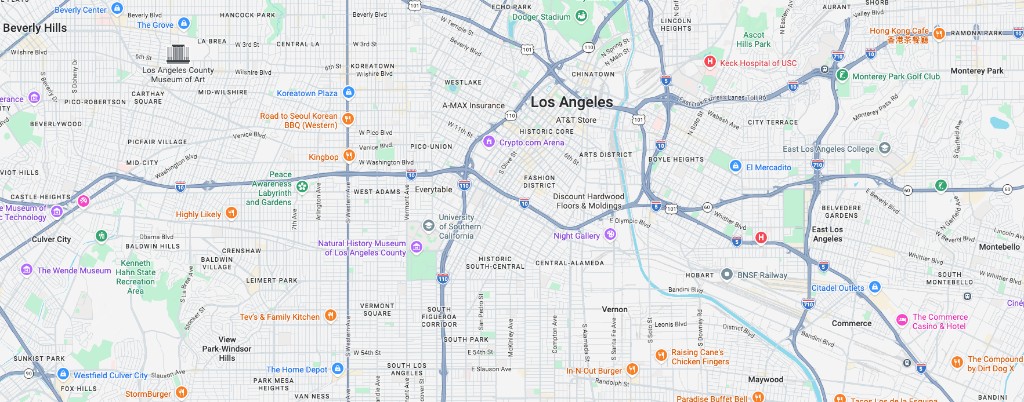
- Listing
- Smile Studio Dental
- Keyword
- dentist near me
- Grid
- 7 × 7 · 1 mi apart
- Area
- 6 × 6 mi
- Search points
- 49
- Cost
- 49 credits
- Balance after scan
- 2,451
Credits are used when the scan starts. One credit per search point. Balance shown from a full Starter plan (2,500 credits).
Make every grid yours.
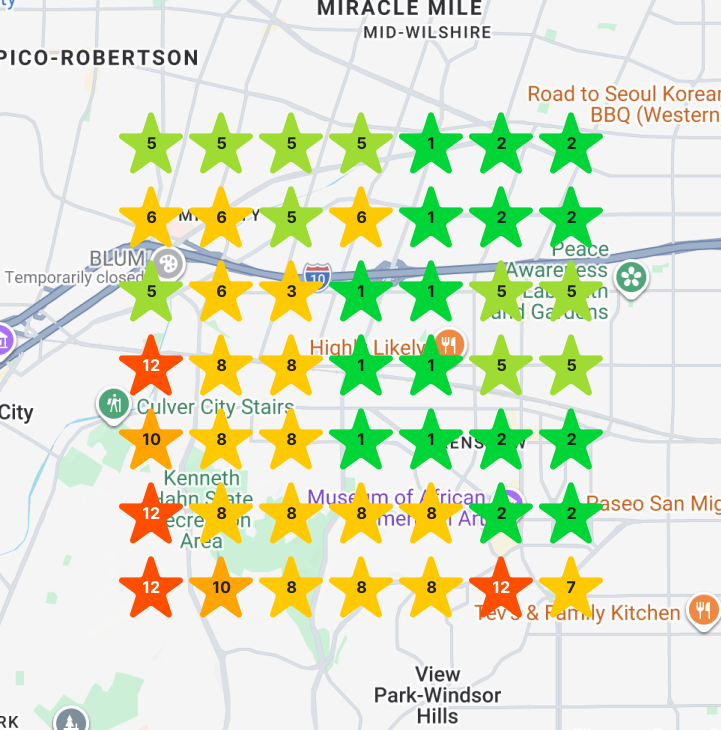
Choose the marker style and a colour for each rank band. Keep it as your account default, save a profile for a client, or change it for one scan.
Use your account defaults or a client's white-label profile.
Custom style for this scan
Star markers
Star
Rank color ranges
Marker color for each rank band on the map (1–20).
- 1–3
- 4–7
- 8–10
- 11–12
- 13–17
- 18–19
- 20
Marker styles and rank colours are on Starter and up. White-label client profiles are on Pro and Agency. Grids above 7×7 depend on your plan.
Who it's for
For businesses and the people who market them.
Local businesses
Check which parts of town can find you and which can't, then scan again after you work on your profile to see if it paid off.
SEO consultants
Report ranking across the whole service area instead of quoting one position, and show clients a before-and-after map rather than a spreadsheet.
Agencies
Save every client's listing with its keywords, rerun scans in a couple of clicks and send read-only report links under your own brand.
How it works
From listing to rank map in four steps.
- 1
Find your listing
Search by name. We pull the address and exact location from Google, so the grid centres on your real listing.
- 2
Pick a keyword
Use the phrase customers type into Google Maps, such as a service plus “near me”.
- 3
Set the area
Choose the grid size and the distance between points.
- 4
Read the map & coach
Points fill in as each search finishes. Open Scan coach for an AI action plan, drill into any point, then share the report.
Pricing
Free to track. Agency to scale.
Core LocalRadars on Free. White-label and client workflows on Agency. Top up credits anytime.
Free
$0
Everything you need to track and improve your local rankings.
Agency
$60 / month
Built for agencies managing multiple clients at scale.
| Features | Free | Agency |
|---|---|---|
| Price | $0 forever | $60 billed monthly |
| Included credits | 49 (starter balance) | 13,000 / 30 days |
| Maximum grid size | 13×13 | 13×13 |
| Buy credits top-ups | ||
| Manual geo-grid scans | ||
| Geo-grid & report customization | ||
| Competitor / ranking insights | ||
| Ranking history | ||
| Scheduled scans | ||
| AI Scan coach | ||
| Shareable reports | ||
| White-label share links (your-slug.localradars.com, logo & colors) | ||
| Hide "Powered by" on shared reports | ||
| Client rollup dashboard | ||
| Choose plan | Get started free | Choose Agency |
Credits
Buy credits anytime
Available on Free and Agency. Any amount from 2,000 credits up.
2,000
credits
$5.00
4,000
credits
$10.00
10,000
credits
$25.00
20,000
credits
$50.00
One-time top-ups, not a subscription. Purchase from Billing after you sign in.
How is each point's rank measured?
For every point on the grid, Local Radars runs a Google Maps search for your keyword from that point's exact coordinates and records where your listing appears, from 1 to 20. If it isn't in the first 20 results, the point shows 20+.
How is this different from a regular rank tracker?
Most trackers search from one location and report one position. Google Maps results change with the searcher's location, so a single number can't show that you're #2 near your office and missing a few miles away. A grid shows both.
What does a scan cost?
One credit per grid point. A 7×7 scan uses 49 credits and a 13×13 scan uses 169. The exact cost is shown before you run anything. Agency gets a new credit balance every 30 days (unused period credits don't roll over). You can also buy credits anytime on Free or Agency — enter a custom amount starting at $5 for 2,000 credits.
Can I buy more credits?
Yes. Buy credits as a one-time top-up on Free or Agency. Enter any amount from 2,000 credits up ($5 per 2,000). Purchased credits don't expire with your billing period and don't change your subscription.
What is Scan coach?
Scan coach is AI-powered coaching on every finished report. It summarizes what your grid shows (where you're strong, where competitors win, and where you're missing from the top 20), then gives three prioritized actions to work on next. It's included on every plan, including the free scan.
What's included for free?
One complete 7×7 scan: 49 grid points, the full rank map, Scan coach AI recommendations, and the businesses ranking at every point. No credit card required.
Can I track changes over time?
Yes. Rerun a scan with the same listing, keyword, grid size and spacing, and the results show how average rank, local pack coverage and top-20 presence changed since the previous scan.
Can I share results with clients?
Every scan has a read-only share link that works without an account. On Pro and Agency, shared reports can carry your logo, colours and company name, and Agency can remove our branding.
How long does a scan take?
Each point is its own search, so larger grids take longer. You can leave the page while it runs. The map fills in as points finish.
Which grid sizes and countries are supported?
Grids from 3×3 up to 13×13 depending on your plan, with points 0.1 to 10 miles (or 0.1 to 25 km) apart. Scans can run in 14 countries, including the US, UK, Canada and Australia.
Free first scan
See your own map before you change anything.
Your first 7×7 scan is free: 49 Google Maps searches around your business, with the competitors at every point. No credit card.